
Custom Hotkeys & Quick Macro Automation
Bind your most frequent publishing, renewing, and account switching actions to global keyboard shortcuts for lightning-fast workflows.
What it does
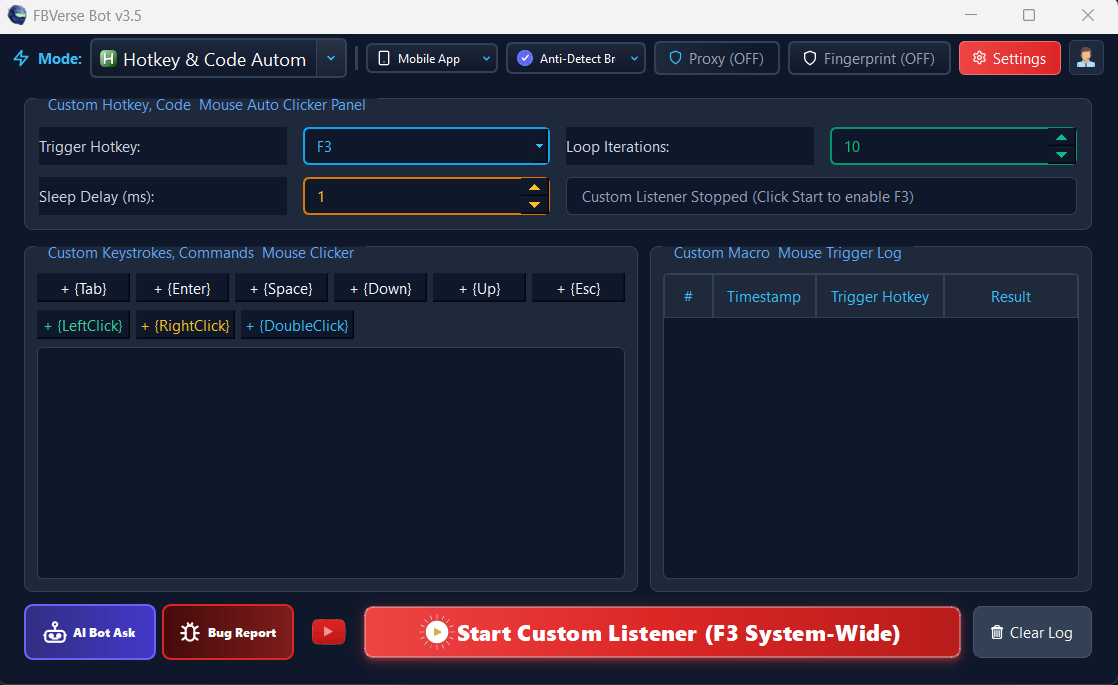
Power sellers who prefer hands-on control over their operations can now execute repetitive publishing routines in fractions of a second. The Hotkey Automation Suite in FBVerse Bot v3.7 allows you to bind global hotkey triggers to complex multi-step automation scripts.
From cycling browser profiles with a keypress to triggering bulk renewal routines or posting pre-formatted ad drafts, the low-latency hotkey engine runs smoothly in the background while you focus on sales.
How it works
Choose a macro action
Renew focused listing, switch to next profile, post a prepared draft, and more.
Bind your keys
F1-F12 or Ctrl/Alt/Shift combinations - whatever your muscle memory likes.
Activate and work
Shortcuts run globally in the background while you browse normally.
Key capabilities
- Trigger Bindings: F1 - F12, Ctrl/Alt/Shift Key Combinations
- Macro Sequences: Key Delays, Mouse Click Coordinates, Text Paste Hooks
- Execution Speed: Sub-Millisecond Hook Response Time
- Background Operation: Operates Globally Across Multi-Window Workstations
- Visual Feedback: On-Screen Execution Toast Notifications & Sound Chimes
- Safety Pauses: Global Emergency Killswitch (Esc / Pause Break)
Results depend on account age, setup quality, proxies, and how the tool is used day to day.
Tips for best results
Bind your three most repeated actions first; that is where the hours come back.
Keep the emergency killswitch (Esc) in mind before running long macros.
Use on-screen toast confirmations so you always know a macro fired.
Combine with the F2 renewal hotkey for a full keyboard-driven inventory routine.
Common questions
What can a hotkey actually trigger?
Multi-step macros: key sequences, clicks, text pastes, listing renewals, profile switching - most repetitive console actions can be bound.
Do hotkeys work outside the app?
The hook is global, so the shortcut works while a Marketplace window is focused - exactly where you need it.
What if a macro misfires?
A global killswitch (Esc / Pause Break) halts everything instantly, and every execution is logged with a timestamp.
Related features
Try Custom Hotkeys & Quick Macro Automation today
The free 24-hour trial includes every feature. No card required.